Oct 22, 2026
 14 min read
.png)
A fleet manager notices something unusual in yesterday’s trips. A Wialon partner is preparing a customer’s account and wants a second opinion on the setup. Both have a question worth pursuing. Wialon holds much of what they need: live fleet data, flexible tools, and knowledge built over 24 years in the field. The value comes when that knowledge and data help them make a better decision or get the job done. Our ambition for AI is to make that connection easier, from the first question to the work that follows.
Ask. Analyze. Act. These are three ways AI can help people work with Wialon. Ask Lona, our AI assistant, for guidance informed by our teams’ expertise. Explore what your fleet’s data or a customer’s setup can tell you with Wialon connected to ChatGPT. Ask an AI agent to take on a task inside Wialon, with you deciding which changes to approve. Partners and fleet teams choose where to begin and how far to take it.
What does that look like in practice? And what happens behind the scenes, where an AI answer needs checking or a task involves changing a customer’s setup? Let’s look at what the tools can do, how we check their work, and where your judgment comes in.
Ask: Lona, Wialon’s AI assistant
A partner’s work rarely stays within one neat category. Choosing a device leads to questions about configuration; exploring a feature sparks an idea for a service the partner could offer. Lona, Wialon’s AI assistant, helps partners work through those questions with product documentation and knowledge developed by our teams.
My requests, a special section in our partner portal my.wialon.com, brings inquiries to Wialon teams into one place. Partners can submit questions, track open and resolved requests, and search earlier conversations. Lona offers initial guidance, asks for details when needed, and helps route the inquiry to the right team. A human specialist remains available throughout.
A technical question today, a marketing question tomorrow. Lona draws on the knowledge and support workflows specific to each subject. She also takes into account which Wialon products the partner uses, so the guidance fits the question. Wherever you use Lona, you can ask questions and get answers in any language you’re comfortable with.
Lona is also there when you’re exploring Wialon or choosing hardware. In the Wialon help center, partners and fleet users can ask her about features and find relevant instructions. Through the Hardware section on wialon.com, anyone researching devices can get guidance on capabilities, selection, and configuration for supported manufacturers.
AI-powered technical support: Less waiting, human expertise behind every reply
A customer is waiting. A vehicle isn’t appearing as expected, or a report needs a closer look, and the partner needs to know what to check next. With AI-assisted replies now part of technical support, help arrives sooner. By September 2026, half of support replies reached partners within 6 minutes. In February, before AI-assisted replies were introduced, half took more than an hour. For partners, that means less time waiting for guidance and a chance to help the customer while the problem is still in front of them.
Lona draws on years of hands-on work by our Technical Care engineers: troubleshooting software, configuring hardware, guiding migrations, and working through complex integrations. What they learned along the way helps Lona answer the next question, through internal guidance and summaries of support cases that capture what engineers checked and what solved the problem. We spent more than a year working on answer quality before bringing that guidance into the support conversation. The team keeps adding to it as new cases reveal something worth learning.
Lona can also look into the account behind the question. With read-only access to relevant account, user, and unit settings, she can offer advice informed by the actual setup. She can read screenshots and PDFs too, giving partners a way to show the problem without having to describe every detail.
__SLIDER_AI001EN__
“Our team is the first line of support for partners’ technical questions. For years, every initial reply depended on an engineer. Lona can now take on many of those first questions, using knowledge our team has built case by case. That’s a huge help. The responsibility for the support we provide is still ours, so reviewing her answers is part of our engineers’ daily work. We check the advice, follow up when it needs correcting, and improve the knowledge behind it. There’s a lot of human work in making an AI reply something a partner can rely on.”
— Natalia Evpak, Head of Technical Care L1, whose team played a major role in building Lona
And if the partner wants to talk to a person? They can ask for a Technical Care engineer in the first message or later in the conversation. Our team is still available 24/7, with the same response times set out in our technical support regulations.
How we check Lona’s answers in Technical Care
Speed matters when a customer is waiting. So does getting the advice right. Reviewing AI responses is part of our Technical Care engineers’ work: they check technical accuracy and whether the answer addresses the question or offers a practical solution. An incorrect answer, or one that misses the core solution, is flagged with an explanation of what needs correcting.
Then we look beyond the reply. Was the recommended change applied? Is the issue still unresolved? Before closing a request that involved a practical change, we check what happened in Wialon. If incorrect advice appears to have left the problem unresolved and the partner hasn’t replied, we follow up with the correct guidance. What we learn feeds back into the knowledge base and the assistant’s settings.
So what does this look like in numbers?
In September 2026, she helped answer 69% of the 1,655 support requests, with engineers joining the conversation where needed.
And how well did those answers hold up? Our engineers gave positive assessments to 94% of the AI replies they reviewed that month. They checked that the advice was technically sound, answered the partner’s question, and helped them work toward a solution.
The partner’s reply completes the picture. A quick “That worked” tells us the advice helped in practice; a follow-up about a persistent problem gives our team something to investigate. We welcome both, because they help us improve the support partners receive.
Analyze: Two ways to explore Wialon with ChatGPT
Wialon Hosting: A conversation with fleet data
“Which vehicles are offline right now?” For a dispatcher preparing for the day, it’s a question that helps establish what needs attention. The information is already in Wialon. Now the fleet team can ask for it in ChatGPT.
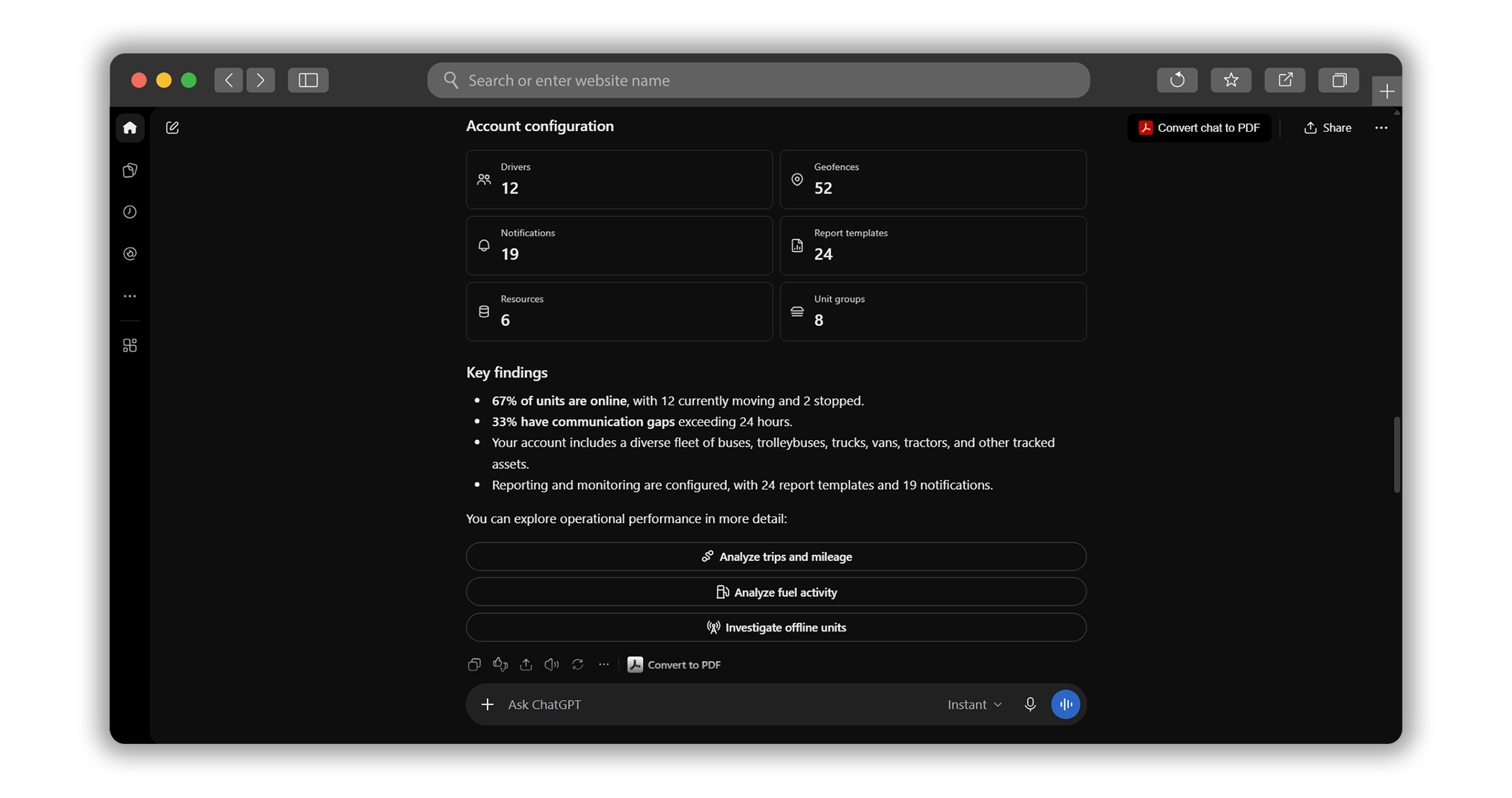
In June 2026, we launched the Wialon plugin for ChatGPT, giving fleet managers, owners, and dispatchers a way to explore their Wialon Hosting data in a familiar chat. Once they connect their account, they can ask about vehicle status and locations, trips, fuel activity, and alerts. Access is read-only: they can investigate what’s happening across the fleet, but cannot change settings or send device commands through ChatGPT.
“For many people, opening ChatGPT is already part of the day. We wanted checking on a fleet to feel just as natural, so we brought Wialon data into an interface they already know. A few months after launch, people are exploring Wialon in ChatGPT every day, and that number is growing. That’s what I’m proud of: we built something people keep coming back to. The questions and suggestions they send us help us improve it further. Little by little, asking ChatGPT about a fleet is becoming a habit of its own.”
— Artem Filimonchyk, Head of Technical Care L2, who built the Wialon plugin for ChatGPT
A question as simple as “Give me an overview of my fleet” can bring together vehicle status, account details, and findings worth exploring further.
__SLIDER_AI002EN__
Wialon Platform: Account insights for partners
Partners building fleet management solutions with Wialon Platform have a separate ChatGPT plugin. It draws on Studio, the workspace where they manage customers and solutions, to answer questions about enabled features, connected devices, and recent trips. It also helps with product documentation and the API that developers use to integrate other software with Wialon Platform.
Act: Delegate work inside Wialon
A new fleet project brings plenty of work inside Wialon. An AI agent can roll up its sleeves and get into the account: examine the setup, pull together the data, and create or adjust what the project calls for. It asks for approval before making changes by default, so the partner’s team keeps the final say. Powered by flespi, another product in the Gurtam family, the agent gives the team an extra pair of hands for everything from account setup to analysis.
How about creating more than 30 sensors for a Teltonika device and adding them to a report? Or drawing geofences for Berlin’s districts in just a few minutes? These are jobs an agent can take on, freeing the team from working through every setting by hand. That leaves more time for customer conversations, refining solutions, and developing new services.
And setup is only part of the picture. A partner can ask the agent to prepare a fleet overview, investigate unusual fuel drops, or look for settings that don’t quite fit the way a fleet operates. It may also spot a Wialon capability the fleet could put to better use. With memory and scheduled tasks, a useful one-off investigation can become a regular review, ready for the team each morning.
What else could it take off the team’s hands? There’s room to be inventive with the brief. The examples that follow show a few possibilities, rather than a fixed menu: if the agent has the tools, data, and permissions to carry out a task, partners can ask it to take it on.
Set up the next customer account
“Create an account for GreenLine Logistics with a limit of 20 vehicles, an administrator, a mileage report, and speeding notifications.” One brief brings together several pieces of a new fleet project. The agent works through the proposed setup and flags a detail that needs a decision: the requested username is already taken. The partner’s team can review the plan before the changes go ahead.
An account taking shape from the partner’s brief
Keep up with new units each morning
“Every morning, check which units were created yesterday and send a short summary.” A small request can become a recurring job. In this example, the agent schedules a daily check and groups new units by customer account. It also spots something worth following up: many of the units still have their device identifiers as names. The partner’s team gets an update and a useful lead, without checking every account by hand.
Yesterday’s additions, ready for the morning
Turn an account question into a dashboard
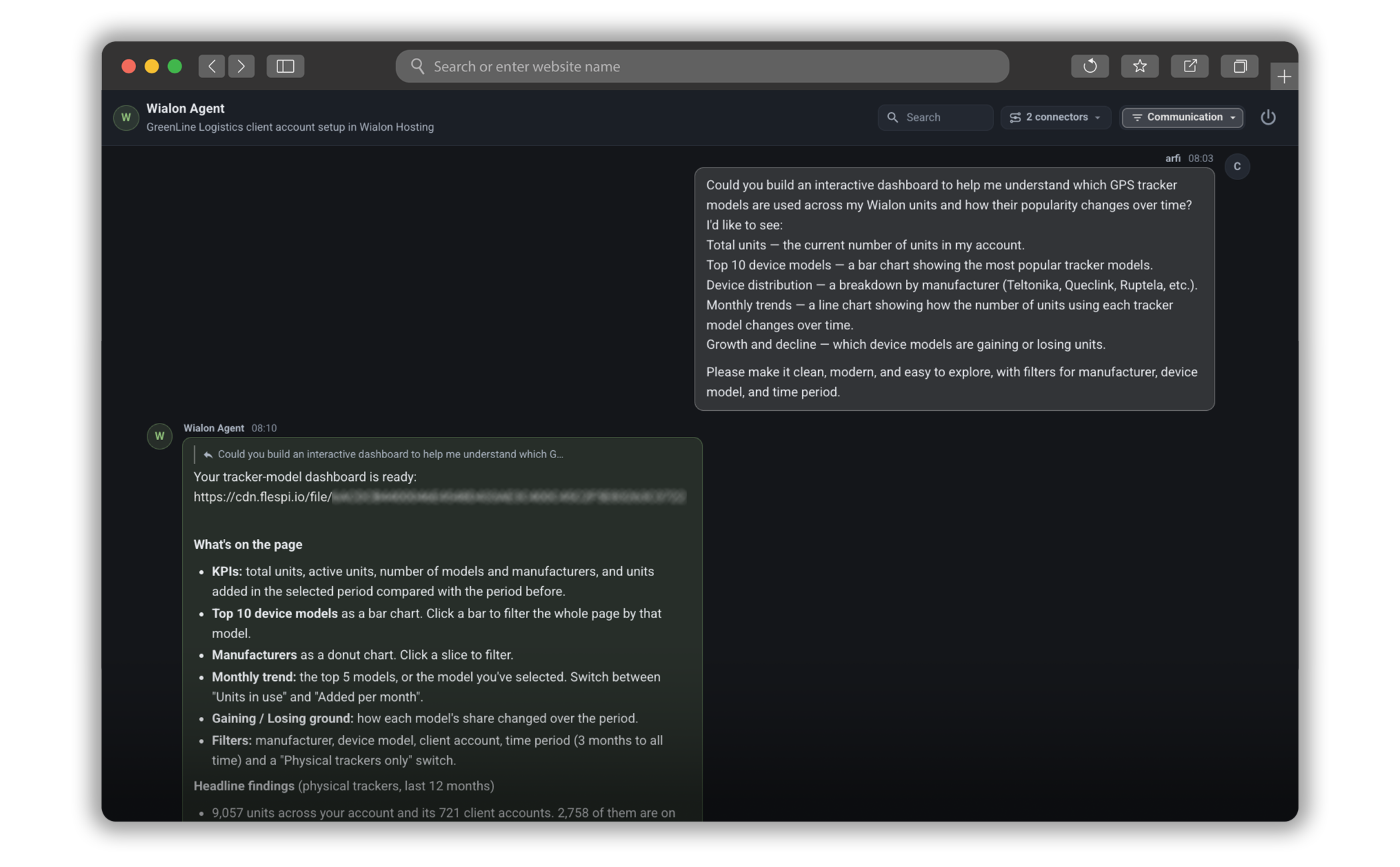
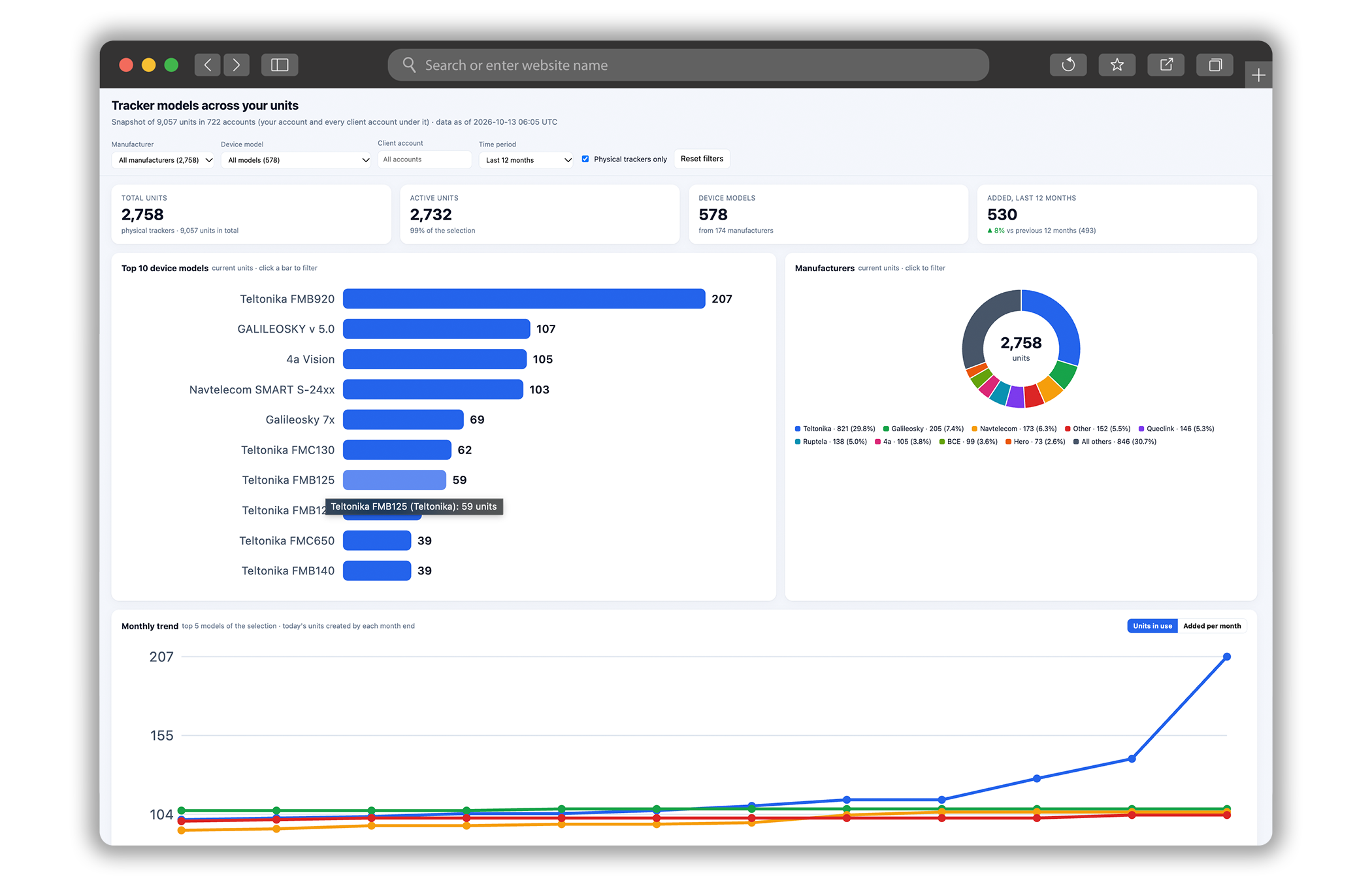
Which tracker models are used across the partner’s accounts, and how is that changing? The agent can take that question beyond a written answer. In this example, it builds an interactive dashboard from Wialon account data, with charts for device models and manufacturers, monthly trends, and filters to explore the results. The team can look across accounts or narrow the view, with a dashboard built around the question it wanted to answer.
__SLIDER_AI003EN__
In Wialon Platform, the AI agent is already in Studio
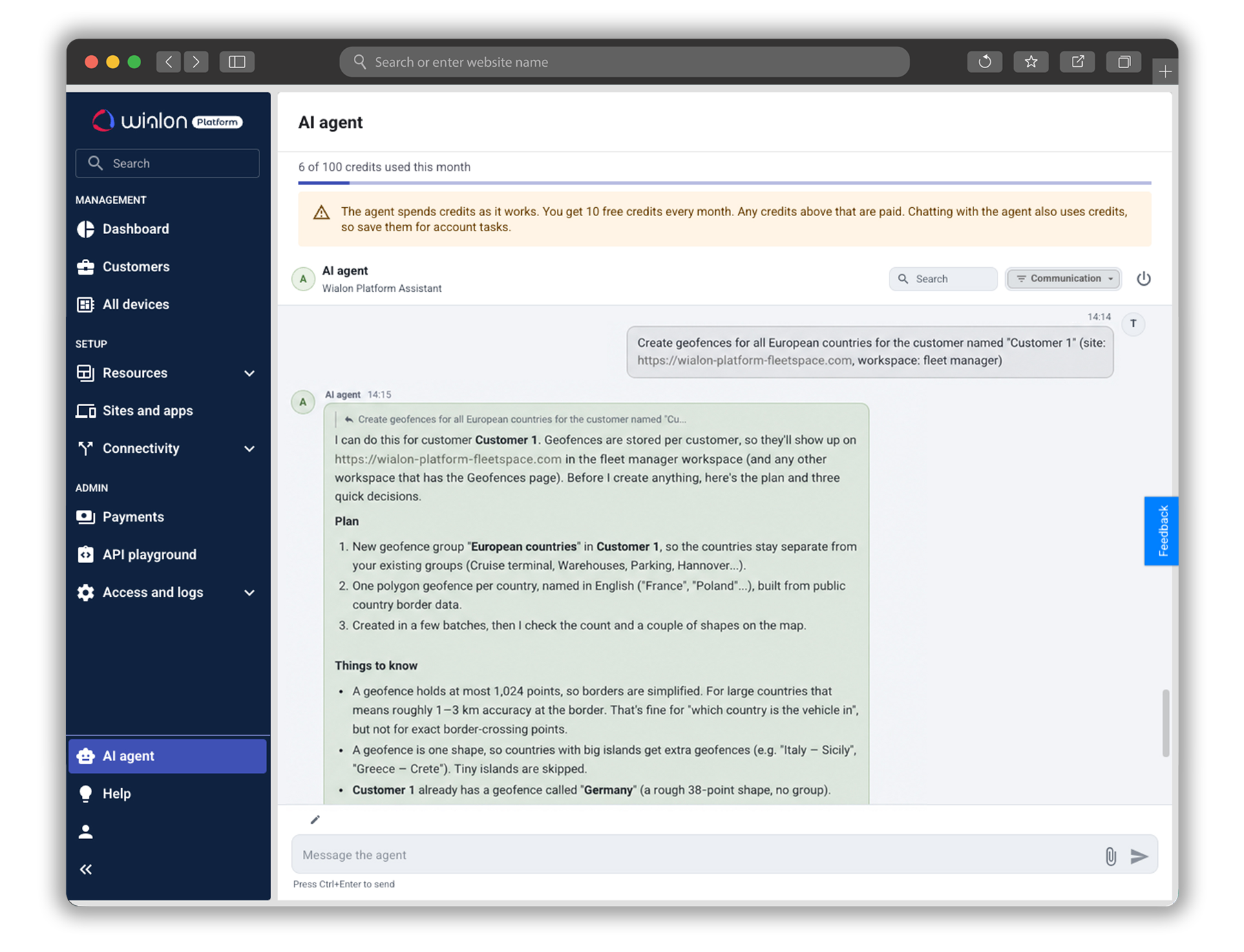
With Wialon Platform, putting an agent to work can start right in Studio. The AI agent is built into the workspace where the team already creates and manages its solutions. It can help configure a solution, investigate an issue, or turn an idea into a dashboard — or even a small app.
Think of it as bringing a colleague into a task. Explain what needs doing, which accounts or devices are involved, and what the finished result should look like. The agent can then work through the steps, from the brief to the result, asking for clarification when needed. It’s built for doing the work, so a clear assignment gives it the best chance to be useful.
__SLIDER_AI004EN__
You get 10 free AI credits per month, whether you’re already using Wialon Platform commercially or exploring it on a trial. Chatting with the agent also uses credits, as does carrying out the task. Give it the relevant details and the result you’re after in one message, so it can spend less time asking questions and more time doing the work.
Want to take on more? If you’re using Wialon Platform commercially, you can increase the credit limit for an additional charge. During a trial, the limit stays at 10 credits per month.
Note that the AI agent is available only to users with the Administrator role. For more details, see the AI agent guide for Wialon Platform Studio.
Connecting an AI agent through flespi
Partners can also connect an AI agent through a separate flespi account. A free account is enough to get started, and the guides for Wialon Hosting, Wialon Platform, and Wialon Local 2604 walk through linking the agent to the relevant product. Once connected, there’s room to experiment: hand over a recurring task, automate a few steps, and see how much time that frees up for customer conversations and new ideas.
Meanwhile, our team is working on bringing the agent directly into Wialon Hosting — stay tuned!
Will AI take over?
A fuel pattern still needs interpreting. A configuration has to fit the customer’s operation. An AI answer needs checking against the problem it is meant to solve. Fleet teams, partners, and our specialists bring that judgment. AI helps them investigate and can take on routine steps, while they decide what to do with the result.
More than 4 million vehicles are connected to Wialon. Behind that number are dispatchers planning the day, partners supporting customers, and fleet teams making decisions about their operations. We understand the responsibility that comes with that scale. It shapes how we apply AI: engineers review Lona’s Technical Care advice; access to Wialon Hosting through ChatGPT is read-only by design; and agents work within their connection’s permissions and approval rules. By default, the Wialon agent connectors ask before making account changes, and their actions are recorded.
“A partner may look at these tools and think, ‘We could offer our customer something we couldn’t take on before.’ That’s the kind of ambition I want Wialon to encourage. We have 24 years of experience to draw on, and AI gives us new ways to put it to work. A feature can be available for years without becoming part of a fleet’s daily routine. If AI helps the team finally put it to use, that’s progress in fleet digitalization too. But we have to earn trust in each of those ways. A fleet manager should be able to understand what an answer is based on. A partner should know what an agent is about to change. That is as much a part of the work as building the capability itself.”
— Aliaksandr Kuushynau, Head of Wialon
What will we be asking AI to do a year from now? Some of the most useful ideas may be ones we haven’t thought of yet. We’re ready to explore them, bringing our knowledge of Wialon and fleet operations to each new possibility. The test will remain practical: does it help you understand more, solve a problem, or take on work you couldn’t easily do before? Your questions and experiments will help shape what comes next.
Your turn: Ask. Analyze. Act.
AI across Wialon is already helping people find answers, investigate fleet activity, and work inside accounts. What could it make easier for your team?
- Partners can ask Lona for guidance, explore a solution with Wialon Platform in ChatGPT, or give the AI agent a task directly in Wialon Platform Studio. For connections to other Wialon products, flespi offers another way to put an agent to work.
- Fleet managers and owners can explore their Wialon data in ChatGPT, from a quick fleet check to a closer look at something that doesn’t quite add up.
Follow a hunch or rethink a routine: the next useful application may come from the way you put these tools to work.
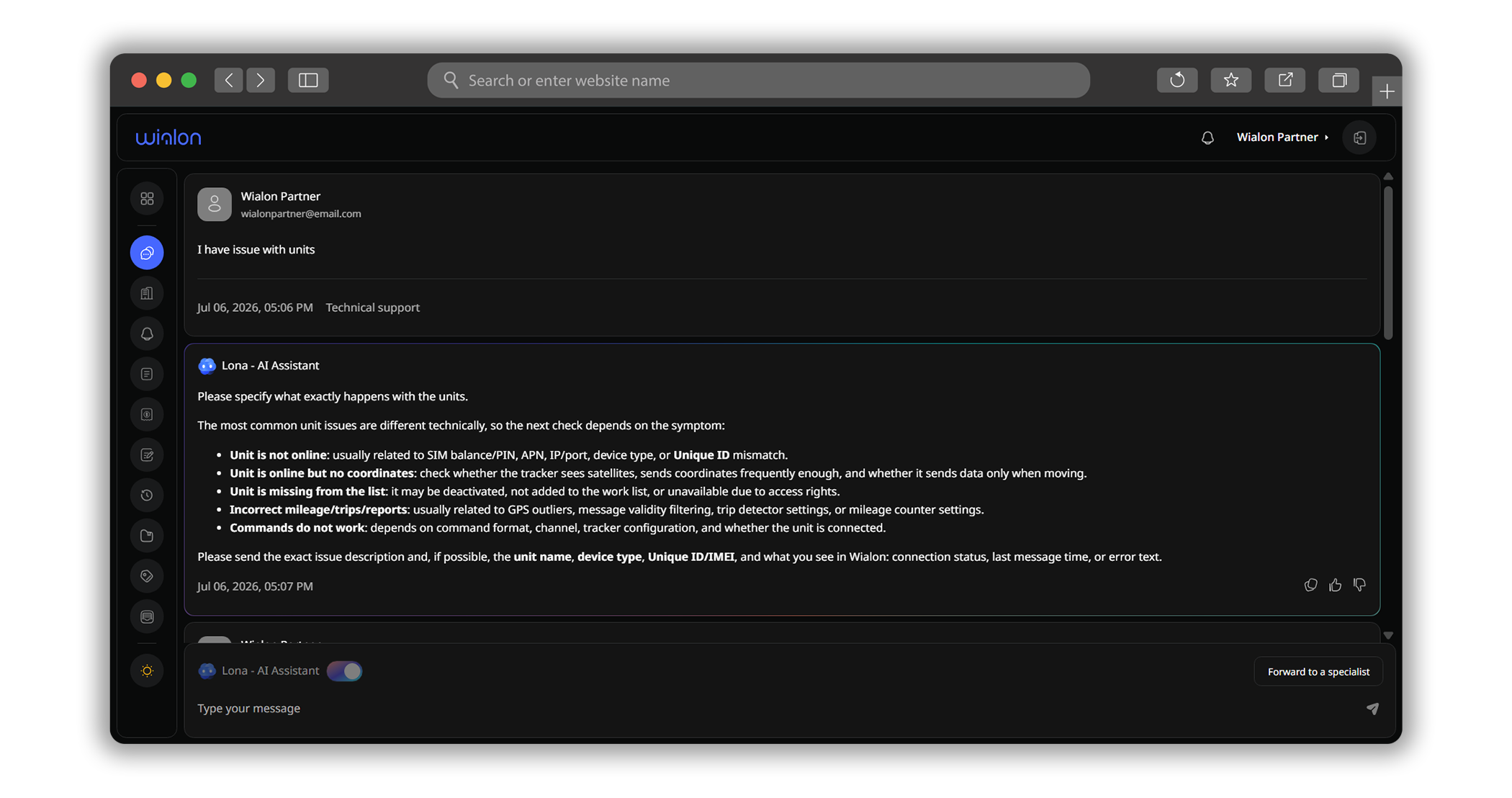
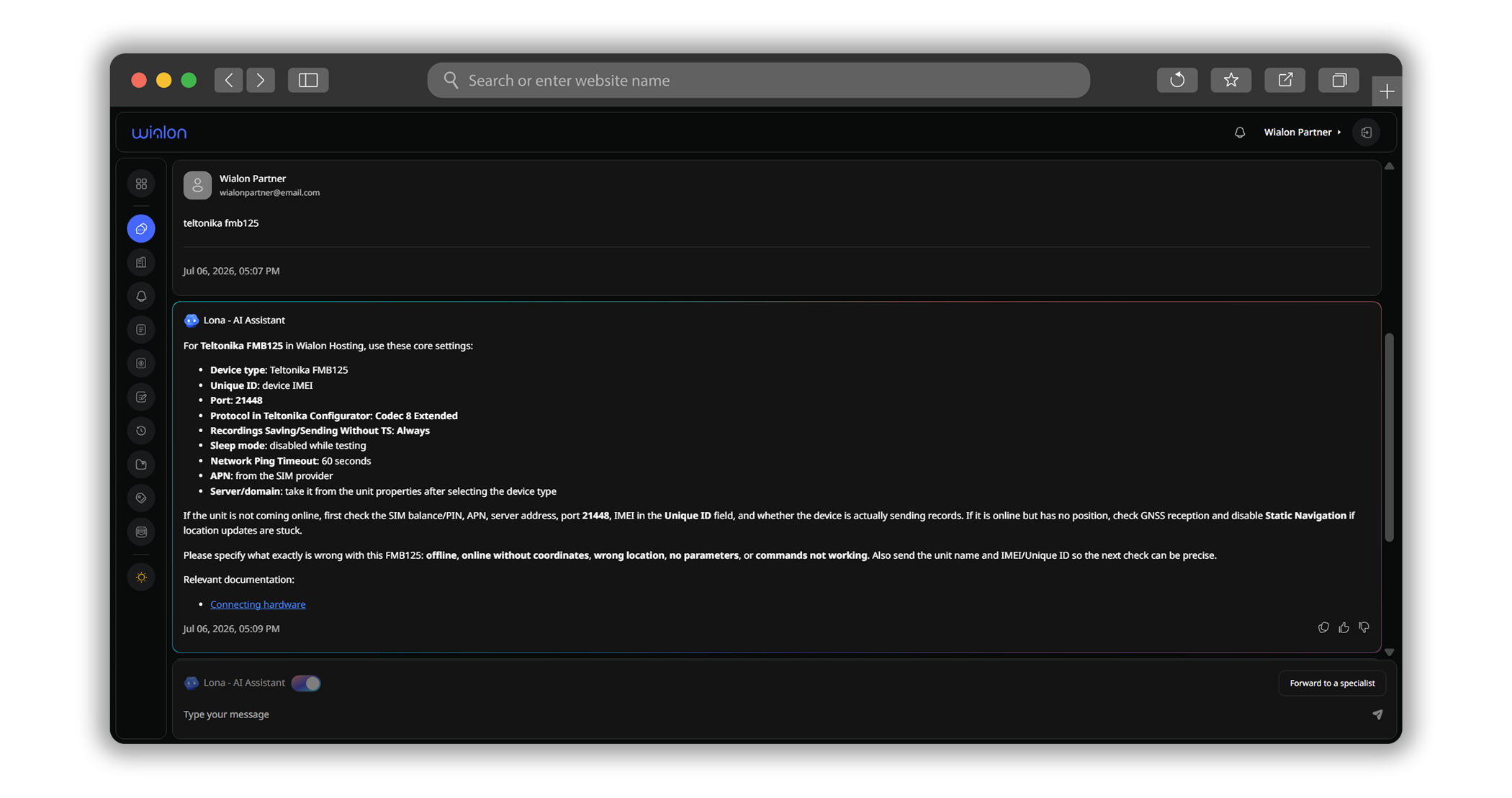
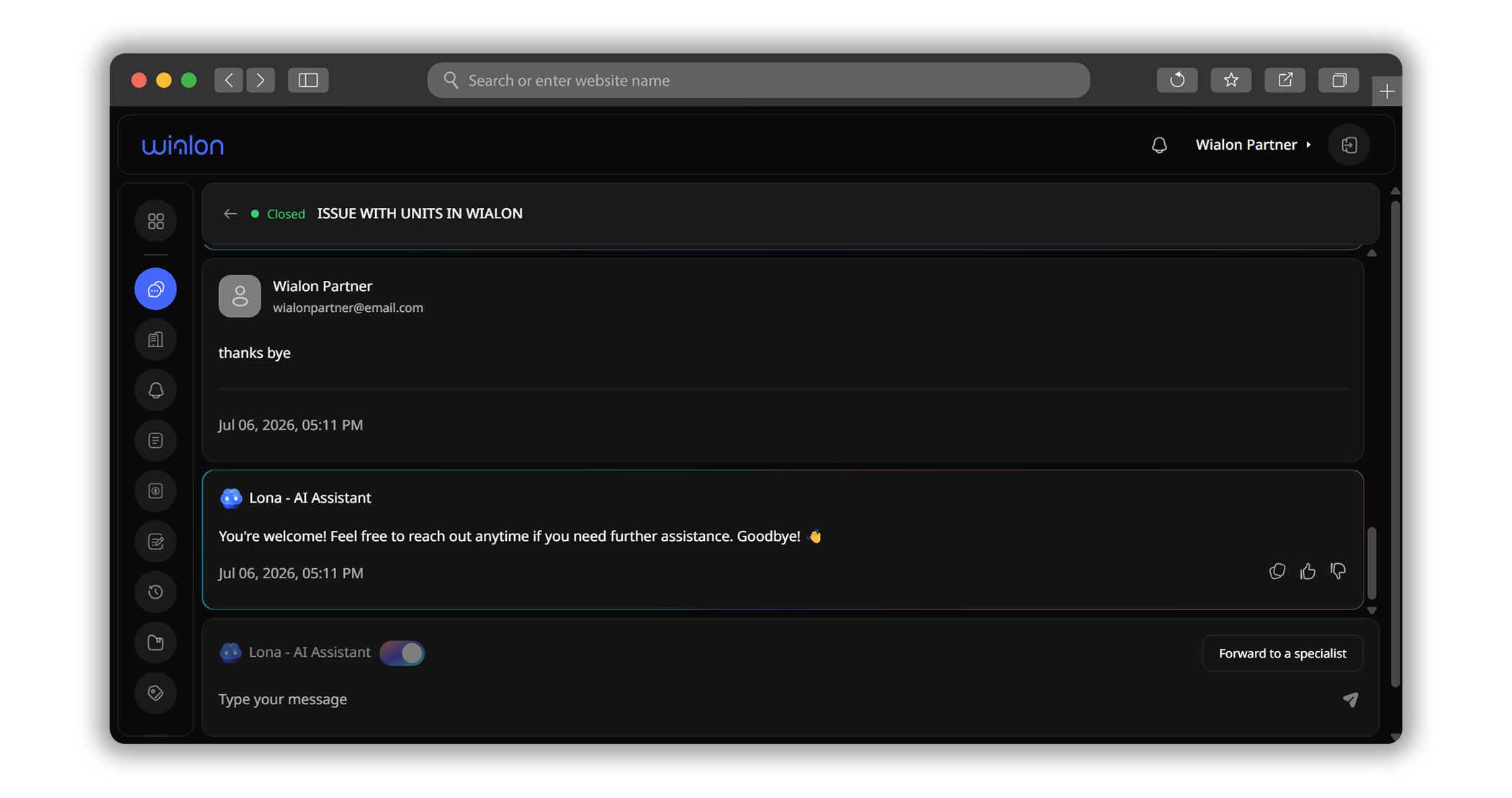
Lona knows the setup — so the answer gets specific
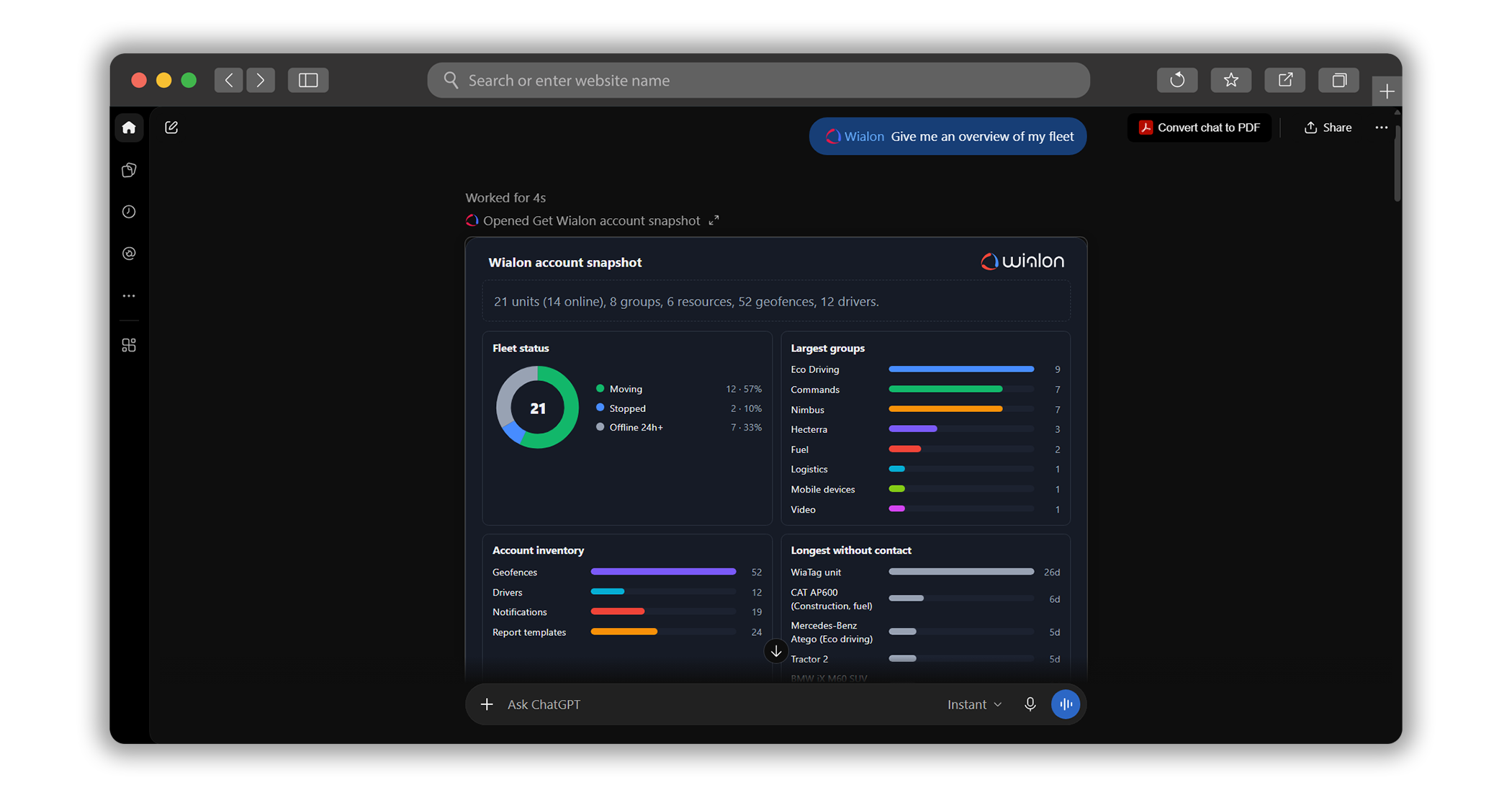
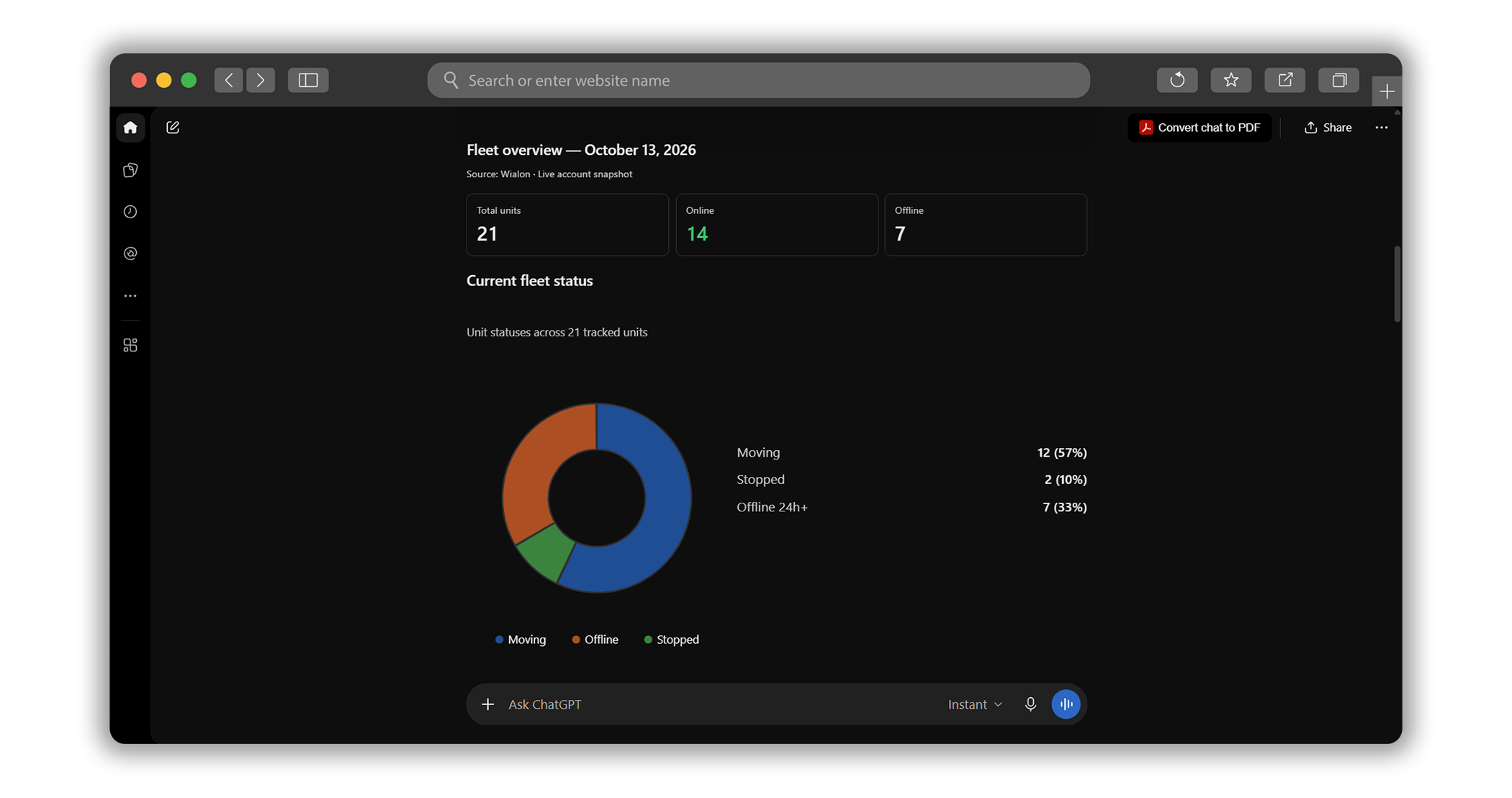
A fleet overview opens up the next question
From a question about trackers to a dashboard the team can explore
.png)
From an idea to a task, without leaving Studio




.jpg)

.png)