Aug 19, 2026
 10 min read
Let’s take a look at the latest enhancements to Wialon Platform and the value they bring to partners and fleets.
This article covers the highlights. For the complete list of recent changes and a preview of what’s next, visit the “What’s new” section in the Wialon help center.
Wialon Platform is built to help telematics service providers launch modern, branded fleet management solutions without starting from scratch. The solution covers the essentials of daily fleet management, and supports more specialized operational needs with features such as tachograph control, emissions control, digital vehicle forms, and other tools built for fleets operating in compliance-focused markets, including the European Union.
From September 15 to 20, we’ll be at IAA Transportation 2026 in Hanover, Germany. If you’re planning to attend, let us know — we’ll arrange a meeting to show you Wialon Platform in action and discuss how it could support your business.
Prefer to watch?Check out this short video covering the most important updates. |
Indoor asset tracking now in Wialon Platform: The map no longer ends at the facility door
For years, Wialon has helped fleets track vehicles on the road. Now, we are introducing indoor asset tracking to help partners extend that visibility under the roof — into factory floors, hospitals, loading bays, and ground-handling areas where satellite signals drop out.
Every large facility faces a similar operational headache: a task needs to start or an assignment is ready, but the right diagnostic rig, mobile generator, or medical pump is nowhere in sight. Workers spend time searching the site manually, taking them away from productive work. Indoor asset tracking takes teams from "It's somewhere in Building B" to "Floor 2, Zone 3" in seconds.
Indoor asset tracking in Wialon Platform uses Teltonika hardware powered by Wirepas Mesh technology. Compact tags attach to physical equipment, while local anchors and gateways pick up their signals and plot them straight onto digital floor plans. On both web and mobile, managers can see the exact floor and zone an asset is in — so teams spend less time walking the building and more time getting work done.
With indoor asset tracking, users can:
- Locate equipment across facilities: Instantly find tagged assets across multi-room, multi-floor, and zoned environments.
- Search and filter quickly: Search assets by name, tag serial number, category, floor, or zone.
- Track tag health and telemetry: Monitor tag battery levels alongside environmental sensors (temperature, humidity, movement). If a physical tag is ever replaced, the asset’s entire history remains intact under the same profile.
- Available on web and mobile: Check asset locations from the desktop workspace or directly in the mobile app while walking the site.
__SLIDER_333EN__
Ready to track assets indoors?
Indoor asset tracking is available on Wialon Platform. You can start setting up digital floor plans, pairing Teltonika hardware, and bringing indoor visibility to your clients today.
Explore the feature in your workspace or contact your Partner Success Manager. If you are new to Wialon, reach out to our team at sales@wialon.com to learn how Wialon Platform can support your business.
Custom reports and enhanced analytics for deeper dives into fleet data
Wialon Platform gives partners more ways to deliver analytics tailored to each customer. Service providers can now create custom reports using datasets for trips, parking, and idling — with relevant metrics selected to match different operational needs. This gives fleet managers ready-to-use templates that reflect what matters to their fleets, with options to filter the data and export results to CSV for further analysis.
Analytics has also become much more interactive, with dashboards now serving as the starting point for deeper analysis. A new drill-down workflow lets fleet managers explore every metric in more detail. A figure on the dashboard catches the dispatcher’s attention, prompting a closer look? A simple click on the dashboard widget opens the underlying data behind that metric, showing the relevant vehicles or drivers.
From there, it is possible to jump directly to the corresponding report with the necessary filters already applied, making it much faster to investigate trends and understand what is driving the numbers.
We've also introduced more flexible dashboard filtering with custom time intervals and device selection, giving fleet managers greater control over the data they want to analyze.
These improvements are available across a wide range of features, including Trips, Maintenance, Forms, Driver behavior, Emissions and more.
Tachograph control updates: More visibility into driver compliance, less routine work
For commercial fleets in Europe, tracking drivers’ resting hours and driving time is essential for complying with EU transport regulations. The Tachograph control feature in Wialon Platform monitors remaining driving time and rest deadlines in real time and notifies dispatchers before violations occur. Let’s take a look at the most important improvements we've introduced to the feature over the past months.
See who’s driving, resting, or nearing a limit — in a single place
The new Live tab gives dispatchers and fleet managers a real-time overview of tachograph data for all drivers across the fleet. It shows each driver’s current status and driving time, remaining driving time, and upcoming rest deadlines in a single interface.
Quick filters at the top of the table help easily view all drivers approaching their driving limit or those who have already exceeded it. Search and sorting functions let dispatchers quickly find a specific driver or organize the data as needed.
To help dispatchers identify potential violations and respond in time, a dedicated Issues column in the Live tab shows when a driver is approaching or has already exceeded EU driving and rest-time limits. If several issues are active for the same driver, the column shows the most severe one.
Automatic driver profiles and vehicle assignments from tacho files
Several routine tasks are now handled automatically. When a tachograph file for a new driver is uploaded, Wialon Platform creates a driver profile based on the file name. This ensures that uploaded files always belong to a driver instead of remaining unassigned.
Wialon Platform can now also automatically assign the driver to a vehicle when the tachograph detects the driver card.
Introducing the Wialon Platform mobile app
Wialon partners can now give their customers access to the new dedicated mobile app, bringing key Wialon Platform functionality to mobile devices.
In the app, fleet managers, dispatchers, and business owners can see their vehicles on a live map, check their current status and key sensor data, receive push notifications for critical events, review trip history, and open individual vehicle details using their existing Wialon Platform workspaces.
The app is currently available in English.
Emissions feature: Clear visibility into the fleet’s environmental impact
Wialon partners can now give their customers access to a new Emissions feature for tracking Scope 1 emissions — the greenhouse gases produced directly when fleet vehicles burn fuel.
The feature calculates CO₂ emissions for each vehicle using its fuel consumption data and preloaded emission factors, allowing fleet operators to analyze their fleet's environmental impact directly within the platform they already use to manage their vehicles.
Using the same standardized factors throughout the reporting period keeps the calculation method consistent and makes the results easier to understand and verify.
Dashboards show how emissions change over time, which vehicles produce the most emissions, and how the figures vary by fuel or vehicle type. Fleet managers can use these insights to spot emission-heavy vehicles and investigate the reasons behind the numbers.
We've also introduced the Scope 1 emissions report, which provides a detailed monthly breakdown of emissions for every vehicle, including fuel type, fuel consumption, distance traveled, and total CO₂e emissions.
Driver app updates
Wialon Driver has received a wide range of improvements over the past few months, making the app more flexible for service providers and more useful for drivers in their everyday work.
Create your own branded Driver app
One of the biggest additions is the ability to create a fully white-labeled version of the Driver app. Partners can now build a mobile app under their own brand by customizing the app name, icon, logo, and color scheme. Once configured, the platform generates a production-ready build that partners can publish to the Apple App Store and Google Play under their own developer accounts.
As a result, drivers download and use the app under a custom brand. Similar white-label capabilities are already planned for the Wialon Platform mobile app.
More control for drivers
Drivers can now switch Private mode on and off directly in the app, allowing them to separate business and personal trips without asking a dispatcher to make the change.
We’ve also added a new Driving score screen that provides drivers with a detailed overview of their performance, including score trends, vehicle-specific results, the most significant violations, and practical recommendations for improving driving behavior.
Push notifications and broader language support
To help drivers stay informed, Wialon Driver now supports push notifications. Service providers can configure automated notifications in Studio, while drivers receive important updates instantly on their mobile devices and can manage notification preferences directly from the app.
We've also expanded the app's localization with support for 10 additional languages, including German, Polish, and Italian, making Wialon Driver more accessible to users across Europe.
Your Wialon Platform assistant inside ChatGPT
Following the recent launch of ChatGPT plugin for Wialon Hosting, Wialon Platform now offers the same capability. Wialon Platform plugin is already available in the ChatGPT plugin directory, designed specifically for our partners managing their customers' accounts, vehicles, and operational data in Wialon Platform Studio.
With it, partners can ask questions in natural language and get answers based on their own platform data. Here are just a few examples of tasks the plugin can help with:
-
Get a quick overview of all customers
-
Check the features enabled for a particular client company
-
Confirm the number of devices linked to an account
-
Review a device’s recent trip history when investigating a question or support request
The plugin can also assist with Platform API and documentation questions, making it easier to find endpoints, understand features, and learn how to configure different Platform functions without switching between multiple tabs.
Role-based access management
Managing user permissions has become much simpler. Partners can now create roles with a specific set of permissions and assign them to multiple customer users. For example, they can create a custom “Dispatcher” role with a corresponding set of permissions and then use it for multiple customer users that need this exact level of access to data and features for their specific responsibilities.
This makes user management faster, more consistent, and easier to maintain as customer organizations grow.
Wialon Platform: Continue exploring
➡️ Get to know flespi — the powerful foundation behind Wialon Platform.
➡️ Learn how the Forms feature makes daily fleet operations more structured and ensures compliance.
➡️ Explore the key Wialon Platform updates over the first months of 2026.
__SOCIALS_EN__
 1.png)
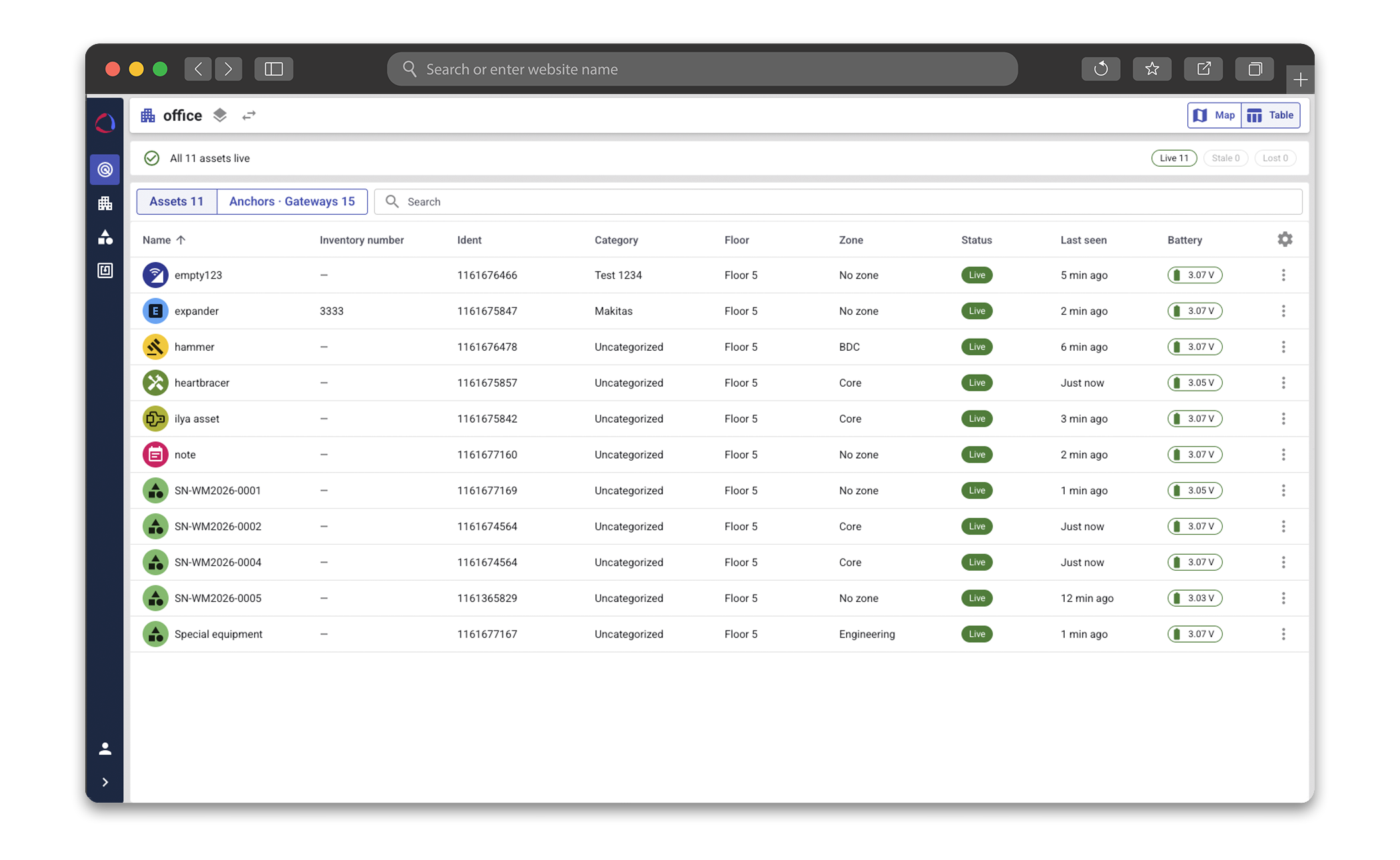
From "somewhere in the building" to the exact floor and zone in seconds: locate tools, equipment, and assets right on digital floor plans.


.jpg)
.png)