Sep 22, 2026
 4 min read
.jpg)
A wheelchair is needed in one hospital department, but it was left on another floor. A shared tool has moved between workshops. A baggage cart is somewhere inside the terminal, just not where the next shift expects it to be. The equipment is in the building, yet finding it takes time.
With indoor asset tracking in Wialon Platform, teams can see the building, floor, and zone where tagged equipment was last detected. For Wialon partners, it extends tracking beyond the vehicles outside to the equipment moving inside a customer’s facility.
The map no longer stops at the facility door
Wialon Platform gives Wialon partners a no-code way to build branded applications for different customer needs. That can mean an everyday fleet management app or a more specialized product for tachograph data, emissions reporting, or indoor asset tracking. They choose the components, shape the user experience, set their own pricing, and remain in control of the customer relationship.
For an indoor tracking project, the Wialon partner recreates the customer’s facility in the platform. They add buildings and floors, upload floor plans, mark rooms or work zones, link tags to assets, and set up user access.
__SLIDER_333EN__
From a tag to a place people recognize
The solution combines tags, anchors, and compatible gateways. Together, they form a Wirepas Mesh network that detects tag locations and sends the data to Wialon Platform, where each detection is matched to the configured building, floor, and zone. The setup has 3 parts:
- A tag is attached to an asset. Its unique ID is linked to that asset in Wialon Platform.
- Anchors placed around the facility detect nearby tags and pass data through the mesh network.
- An internet-connected gateway collects the network data and sends it to Wialon Platform.
Once the network and floor plans are configured, Wialon connects each tag detection to a building, floor, and zone the customer recognizes.
Find the asset, then get moving
Once the site is set up, teams can find equipment and check its tracking status with a few simple actions. They can:
- Search by asset, tag, category, floor, zone, or status.
- See the building, floor, and zone where an asset was last detected.
- Navigate floor plans that use the real names of rooms, departments, bays, and other work areas.
- Check tag connection status and battery level, so teams can act before a tag stops reporting.
- Replace a physical tag without recreating the asset record.
- Search on the web or continue on site with the mobile app.
The Wialon partner configures and brands the solution. For the customer, the process is straightforward: search for the equipment, check its last detected zone, and start there.
Where Wialon indoor asset tracking works best
The strongest use cases are large sites where valuable equipment moves frequently and a missing item can slow down daily operations. Typical examples include:
- Hospitals and care facilities. Help teams find wheelchairs, beds, infusion pumps, diagnostic units, and portable monitors moving between rooms, floors, and departments.
- Factories and industrial sites. Locate forklifts, material-handling equipment, shared tools, mobile machinery, and returnable containers across production and maintenance areas.
- Airports and ground handling. Find baggage carts, tugs, belt loaders, cargo pallets, and other equipment moving through terminals and hangars.
- Construction and rental operations. See the latest indoor location of generators, attachments, high-value tools, and returnable equipment kept across depots and facilities.
People spend less time searching, helping teams return equipment to use before its absence holds up a procedure, repair, shipment, or shift.
One more problem Wialon partners can solve
Wialon partners can offer indoor tracking to customers whose equipment moves through hospitals, factories, airports, and other large sites. It can complement vehicle fleet management or work as a standalone service.
Partners choose how to brand, package, and price the offer and keep control of the customer relationship. Wialon provides the software, so there is no need to build the application from scratch.
See Wialon indoor asset tracking in action
In our joint webinar with Teltonika, experts show the complete flow: how tags, anchors, and gateways work together, how a site is configured in Wialon, and what customers see when they search for equipment.
Considering an indoor asset tracking project?
Explore Wialon indoor asset tracking to see how the setup works, what customers can do in Wialon Platform, and which projects fit.
-
Already a Wialon partner? Take your customer scenario to your Partner Success Manager or write to partners@wialon.com.
-
New to Wialon? Contact our team at sales@wialon.com to learn more, request a demo, or discuss a trial.
 1.png)
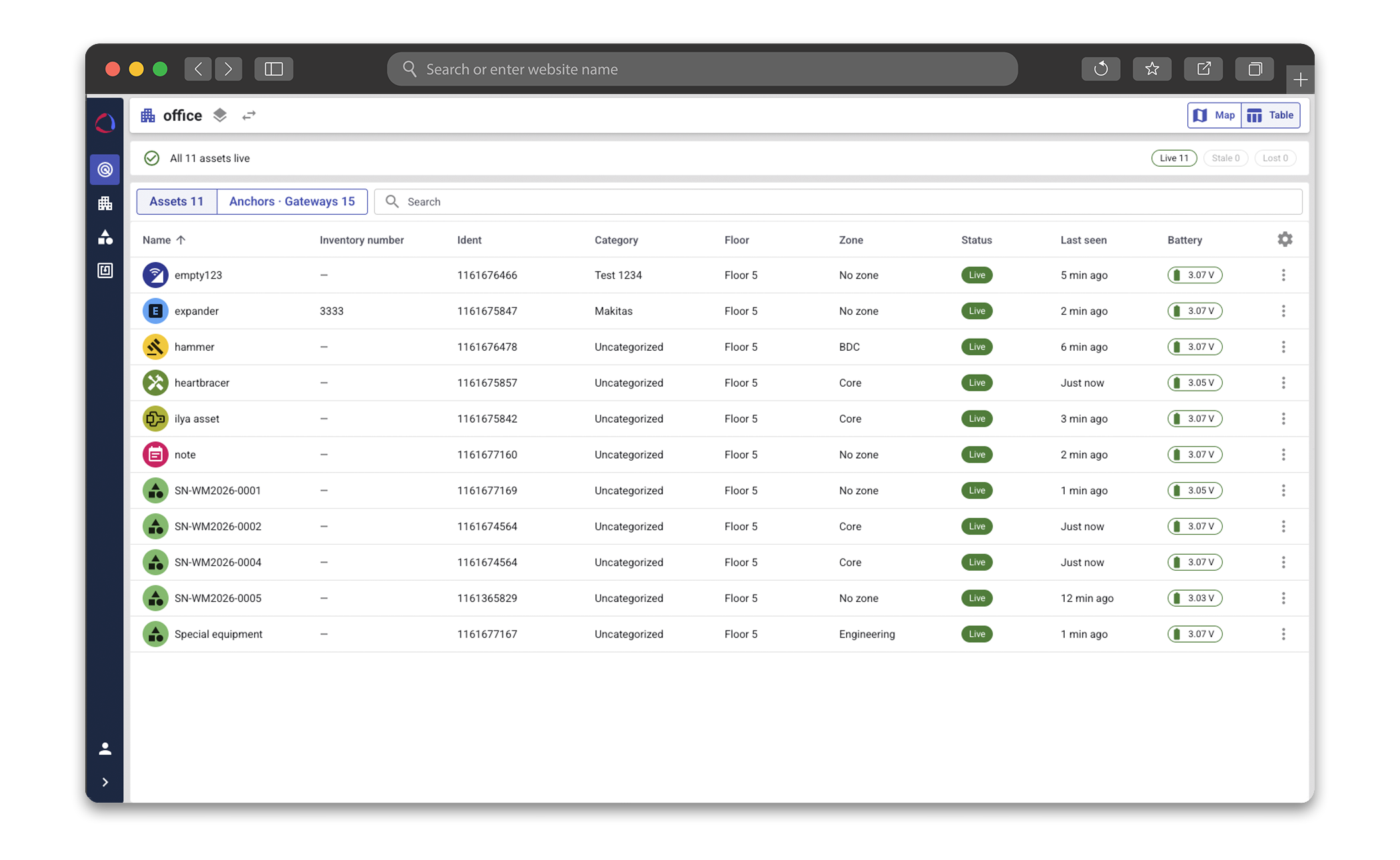
From "somewhere in the building" to the exact floor and zone in seconds: locate tools, equipment, and assets right on digital floor plans.
You asked, we answered: Indoor asset tracking webinar Q&A
The webinar brought up plenty of practical questions about planning, setting up, and using the solution. Here are the answers to those that came up most often.
How precisely can Wialon locate an asset?
The solution uses the standard Wirepas positioning approach, so accuracy depends largely on the network design and anchor placement rather than the tag alone. With a properly planned and installed setup, accuracy is typically within several meters and can reach around 1 meter or even sub-meter levels under favorable conditions.
Actual results also depend on the floor plan, walls, metal structures, radio conditions, and coverage density. In Wialon Platform, teams can see the building, floor, and zone where an asset was last detected, helping them narrow the search to the relevant room or work area. For use cases like locating wheelchairs or equipment, room-level accuracy is usually enough to find the asset quickly.
What technology does the solution use?
The indoor network uses Wirepas Mesh over the 2.4 GHz band. Unlike conventional BLE beacon positioning, it uses a mesh network of tags and anchors. A compatible gateway sends data to the backend via MQTT, while Wirepas communication supports AES-128 encryption.
Which hardware is required?
For now, the solution combines Wialon Platform with compatible Teltonika hardware: EYE Beacon Mesh and EYE Sensor Mesh tags, Mesh anchors, and gateways. The list of compatible hardware is expected to expand over time.
Tags identify the assets. Always-on, battery-powered anchors provide indoor reference points and pass data through the Wirepas Mesh network. A compatible gateway sends the network data to Wialon Platform, where teams can see the latest detected location.
The number of devices depends on the facility, its layout, and how precisely the customer needs to narrow the search.
Where does the solution fit, and when is extra validation needed?
Wialon indoor asset tracking works particularly well in hospitals, factories, airports, depots, and other large facilities where room- or zone-level visibility helps teams find equipment faster.
Projects involving outdoor or underground areas, deliberate radio interference, hazardous environments, or special industry requirements should be assessed individually.
How should a Wialon partner plan anchors, gateways, and coverage?
Typical indoor communication range is about 10–20 meters, but walls, metal structures, floor layout, and expected tag density all affect the final design. The Wirepas positioning dimensioning guide and calculator can help estimate the required infrastructure based on the floor plan and target accuracy.
How many tags can the system handle?
Wirepas Mesh is designed for high-density projects, but there is no single limit that applies to every setup. Capacity depends mainly on how often tags report. For example, one anchor can support approximately 840 tags when each tag sends an update once per hour. With less frequent updates, that number can reach several thousand; shorter intervals reduce it.
Anchor and gateway placement, network design, and radio conditions also affect the result. For larger projects, capacity should be calculated and tested against the expected traffic.
How does Wirepas Mesh handle radio interference?
The network automatically selects less congested channels and coordinates when devices transmit, helping to reduce signal collisions. Walls, metal structures, and other obstacles can still weaken the signal, so these conditions should be checked when planning the site.
How often is the location updated, and how long do batteries last?
For moving assets, a typical update interval is 5–15 minutes. The solution is designed for periodic location updates rather than real-time tracking below 1 minute. The interval can be adjusted to balance data freshness, battery life, and network capacity.
Depending on the settings, movement, and network load, batteries can last up to 10 years. Wialon shows battery status, while Teltonika supports remote configuration and firmware updates through the mesh. The batteries in the current EYE Mesh devices are not user-replaceable, so replacement cycles should be included in the maintenance plan.
How are tags mounted, and what data can they provide?
EYE Beacon Mesh and EYE Sensor Mesh tags have mounting points on both sides, allowing the installation method to be adapted to the asset, surface, and operating environment.
EYE Beacon Mesh supports asset identification and magnet detection. EYE Sensor Mesh also measures temperature, humidity, movement, and magnetic status.
In Wialon, teams can see an asset’s location, tag connection status, and battery level. Sensor readings and device commands are not displayed yet. The solution works with active tags; passive tags and an audible “ping” function are not supported.
Are indoor zones the same as geofences? Can users see history or receive alerts?
Indoor zones serve a different purpose from the geofences used in other Wialon products. They reflect the rooms, departments, bays, and other work areas shown on the customer’s floor plans.
The Wialon indoor asset tracking solution shows where an asset was last detected. Currently, it does not include movement history, reports, or entry, exit, and dwell-time alerts. The focus is on the core use case: quickly finding an asset, such as a wheelchair or tool. As the solution evolves and new use cases emerge, its functionality will expand.
Is the solution available on mobile and through an API?
Yes. Customers can search for equipment on the web and continue from the Wialon Platform mobile app while moving through the facility.
Wialon Platform also provides API access, giving partners the flexibility to connect indoor asset data with other parts of the customer’s workflow.
Can an asset be tracked in different buildings? What about outdoors?
An asset is not tied to a single building or gateway. It can be detected in any building with a compatible, configured indoor network.
Wialon supports both indoor asset tracking and vehicle tracking. These are separate scenarios, so indoor and outdoor movements are not combined into one continuous location history.
Can existing Wi-Fi, BLE infrastructure, or an on-premises server be used?
Wialon indoor asset tracking requires a dedicated Wirepas Mesh setup with compatible tags, anchors, and gateways. Existing Wi-Fi can provide connectivity for a compatible gateway, but it does not replace the anchor network inside the facility.
Existing BLE beacons cannot be added directly to the indoor tracking setup. However, outside the mesh network, Teltonika EYE Mesh tags can fall back to iBeacon or Eddystone broadcasting and work with compatible Teltonika vehicle trackers.
Wialon Platform is cloud-based, so the indoor asset tracking solution is available only in the cloud, not as an on-premises version.

.png)
.png)

.png)